

How cPanel Redis Manager Brings Faster Application Performance to Your Server
Deploy, manage, and monitor Redis without leaving cPanel or WHM
For website owners, developers, and hosting providers who want faster PHP applications, lower database load, and a clean Redis management workflow built directly into the control panel they already use.
cPanel Redis Manager makes that performance accessible through a familiar cPanel and WHM interface, not manual SSH commands.
Why Redis Matters for cPanel Servers
Most cPanel servers rely heavily on MySQL or MariaDB for data storage. That works well until traffic grows, repeat queries pile up, and application response times start creeping higher.
Redis solves this by storing frequently accessed data in memory. Instead of hitting the database for every repeated lookup, your applications check Redis first. The result is a faster experience for visitors, customers, and logged-in users.
For cPanel environments, the challenge has always been making Redis easy to deploy and manage without requiring deep server administration skills. That’s where cPanel Redis Manager comes in.
- Lower latency: Serve hot data from memory instead of waiting on disk-based database queries.
- Reduced database load: Fewer repeated queries mean MySQL can handle more important work.
- Better traffic handling: Redis absorbs repeat requests during spikes, keeping applications more responsive.
Redis Performance Flow: From Request to Response
Understanding how Redis fits into your application stack helps explain why it makes such a noticeable difference. Here’s the flow when Redis is properly configured on a cPanel server:
- Incoming request: A visitor, customer, API call, or logged-in user requests a page, action, or application resource.
- Application checks Redis: The application looks for cached data, stored sessions, or previously generated results in Redis first.
- Serve from memory: If the data is already cached, Redis returns it immediately with far less delay than repeated backend processing.
- Fallback when needed: If the data isn’t in Redis yet, the application fetches it from the database, then stores it in Redis for future requests.
- Faster next response: Users get quicker load times, applications stay more responsive, and the server handles repeated traffic with less strain.
Cache Hit
Data served instantly from memory. Redis delivers the response directly, reducing latency and avoiding unnecessary database activity.
- Faster page loads
- Lower time to first byte
- Reduced MySQL pressure
Cache Miss
Redis warms for next time. The request still completes normally, and Redis stores the result so future requests are faster.
- Safe fallback behavior
- Warm cache population
- Fewer future queries
The cPanel Experience: Redis Without the Command Line
One of the biggest barriers to Redis adoption on cPanel servers has always been the administrative overhead. Traditional Redis management requires SSH access, manual configuration, and ongoing command-line maintenance.
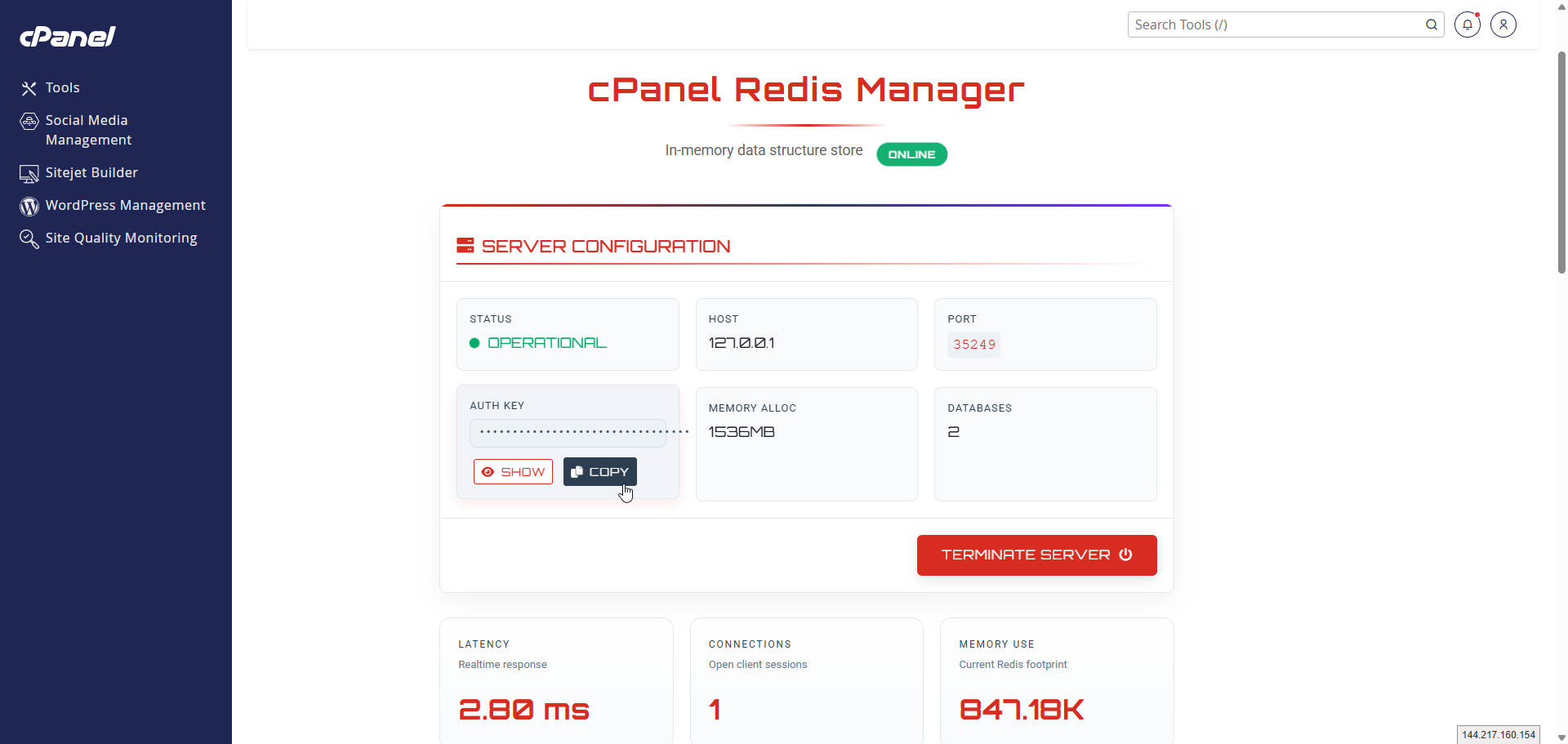
cPanel Redis Manager changes that by bringing the full Redis workflow into the cPanel interface your users already understand. From one dashboard, users can:
- Enable and disable Redis with a single action
- Review connection details including host, port, and authentication keys
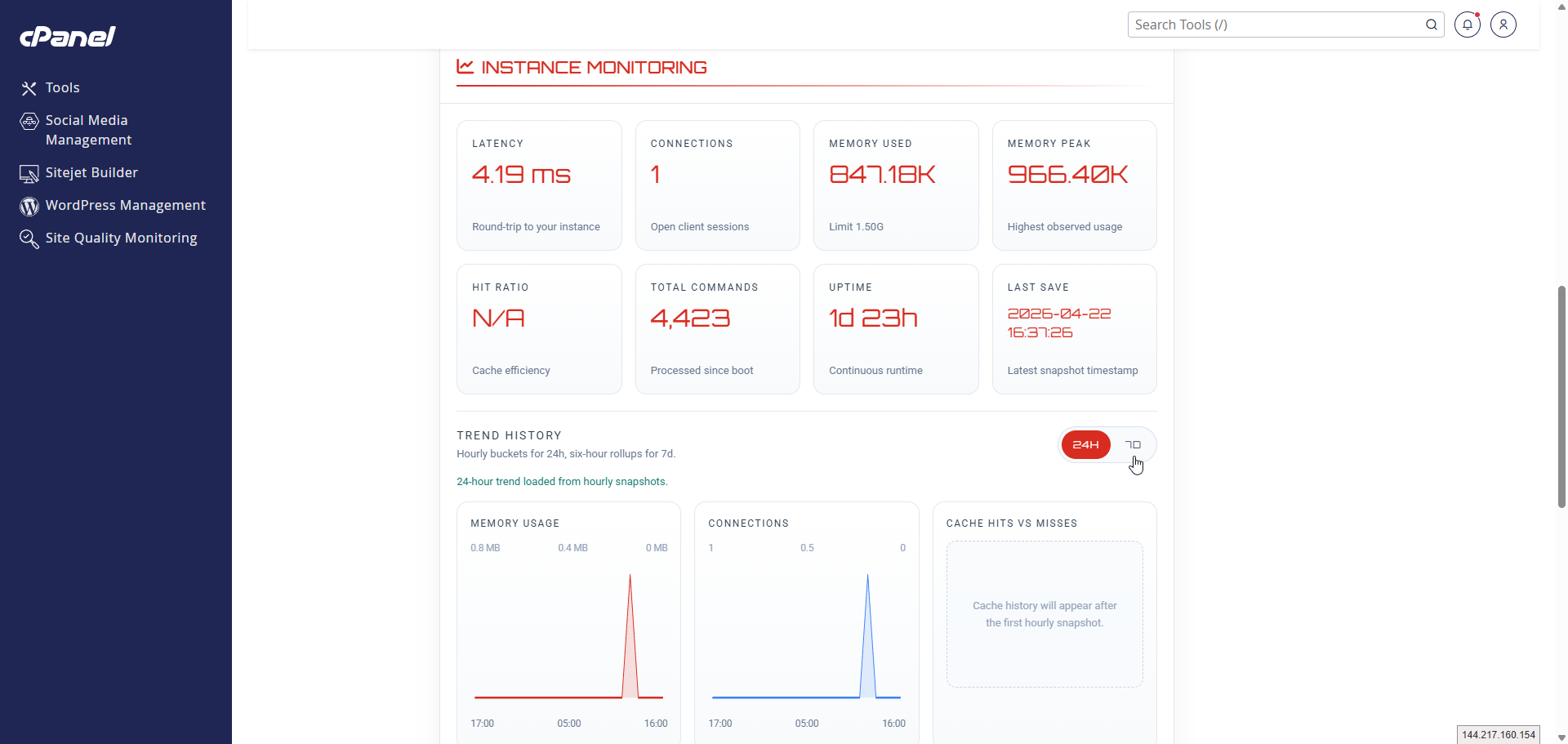
- Monitor live metrics such as latency, connections, memory usage, and uptime
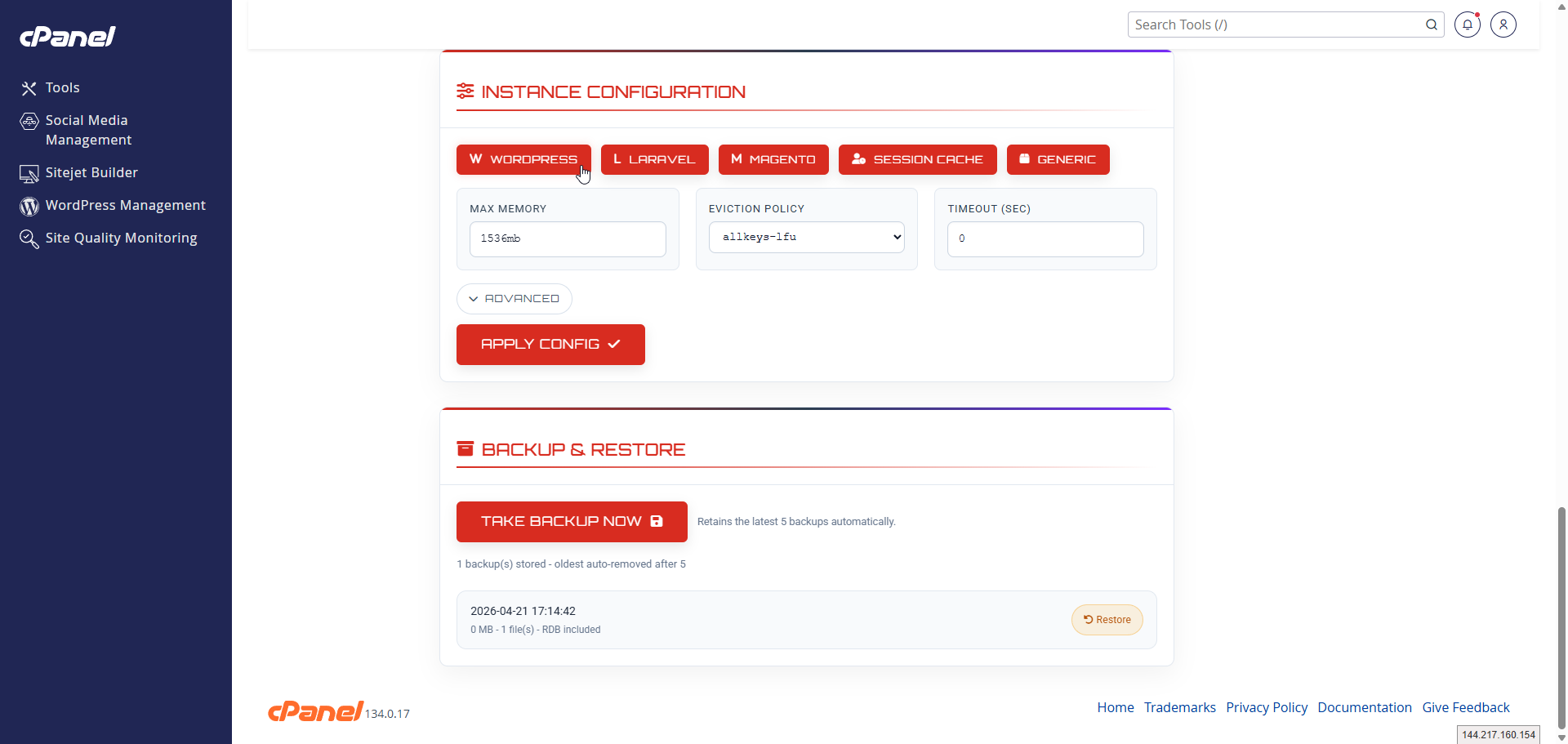
- Apply configuration presets for WordPress, Laravel, Magento, or generic workloads
- Create and restore backups without touching the server file system
WHM Administrative Control: Full Visibility Across Accounts
For hosting providers and server administrators, the WHM side of Redis Manager provides server-wide control that makes Redis operationally manageable across dozens or hundreds of accounts.
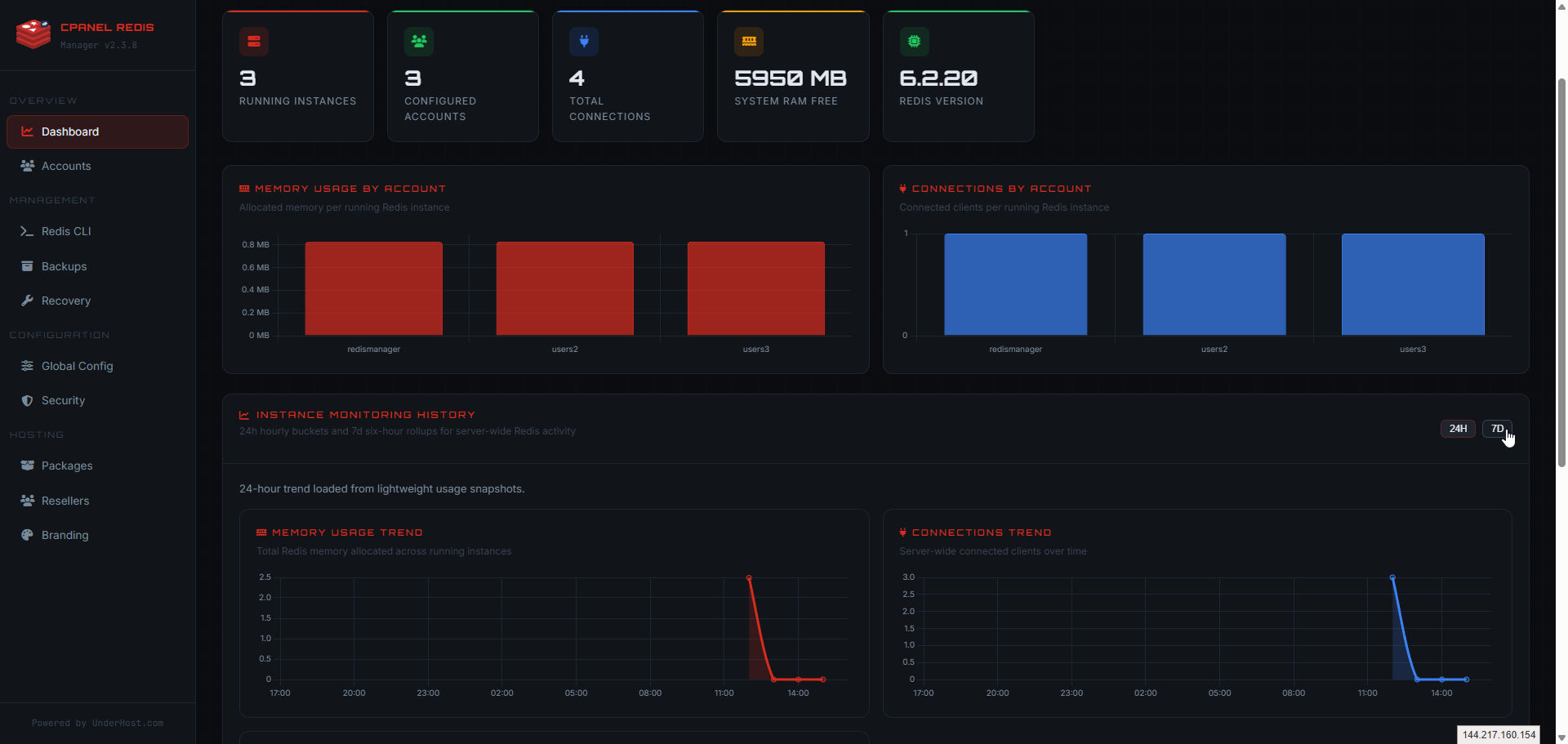
The WHM interface includes everything administrators need for day-to-day Redis operations:
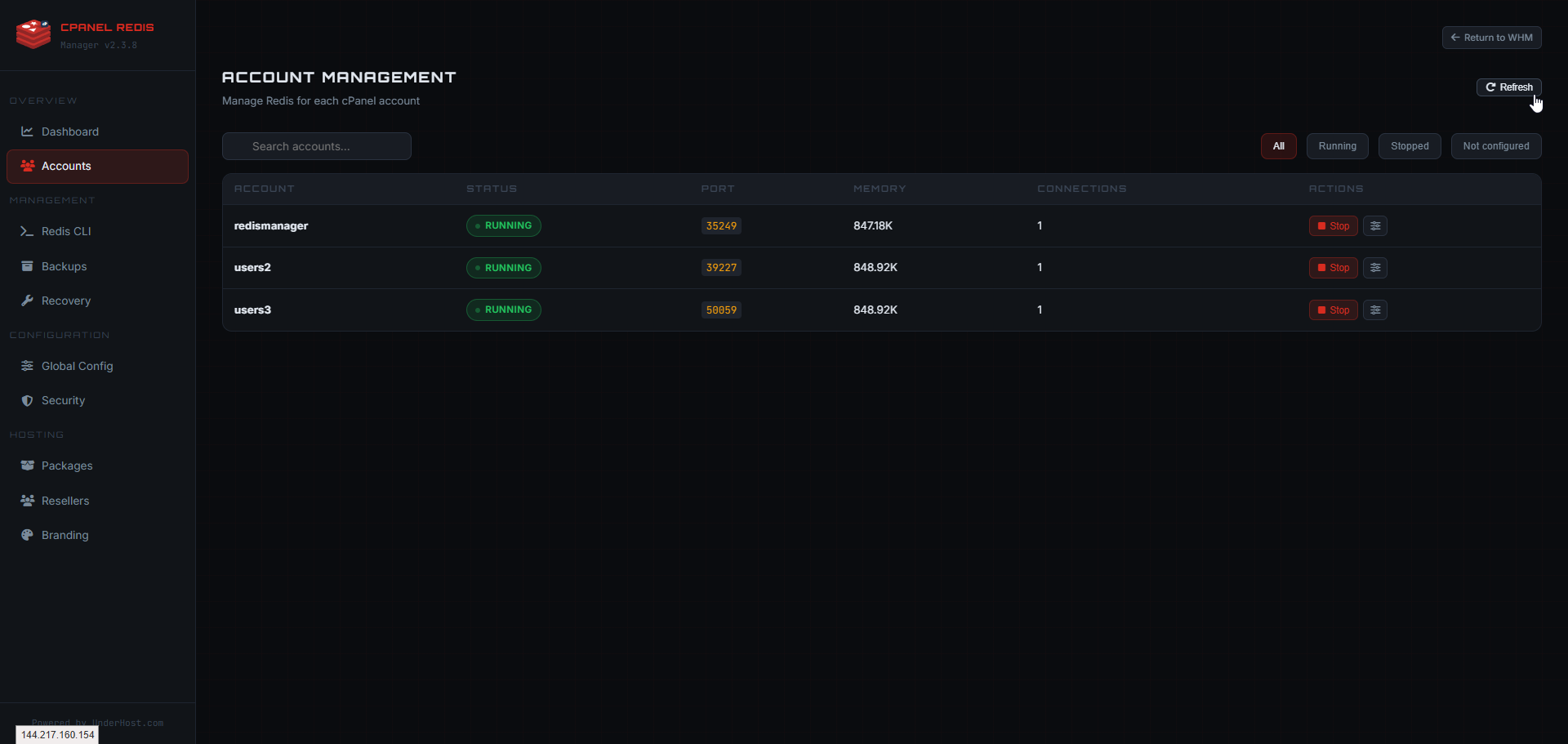
- Account management: Search, filter, and manage Redis instances across all cPanel users with memory and connection visibility.
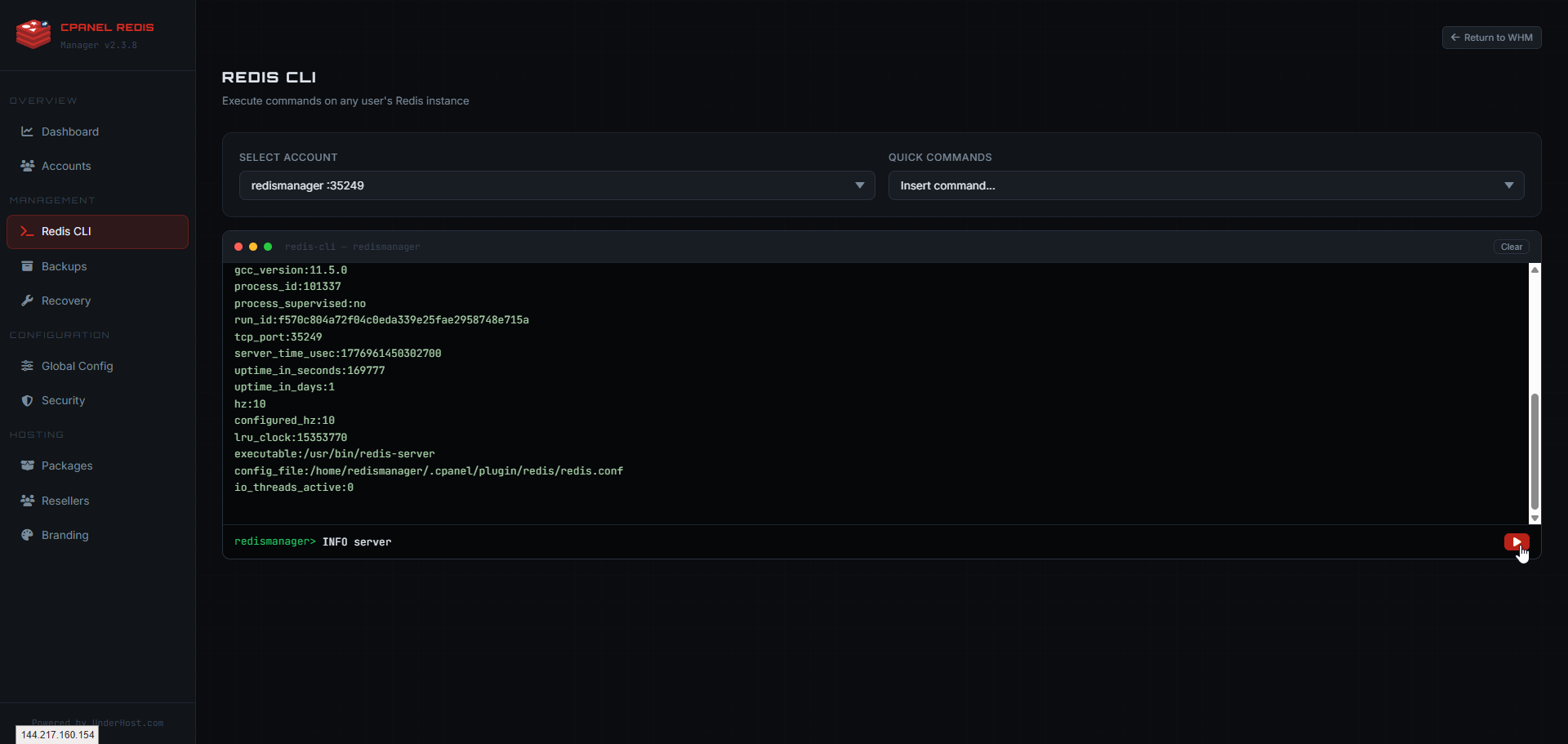
- CLI management: Run Redis CLI commands against individual user instances directly from WHM with account selection, quick commands, and live command output.
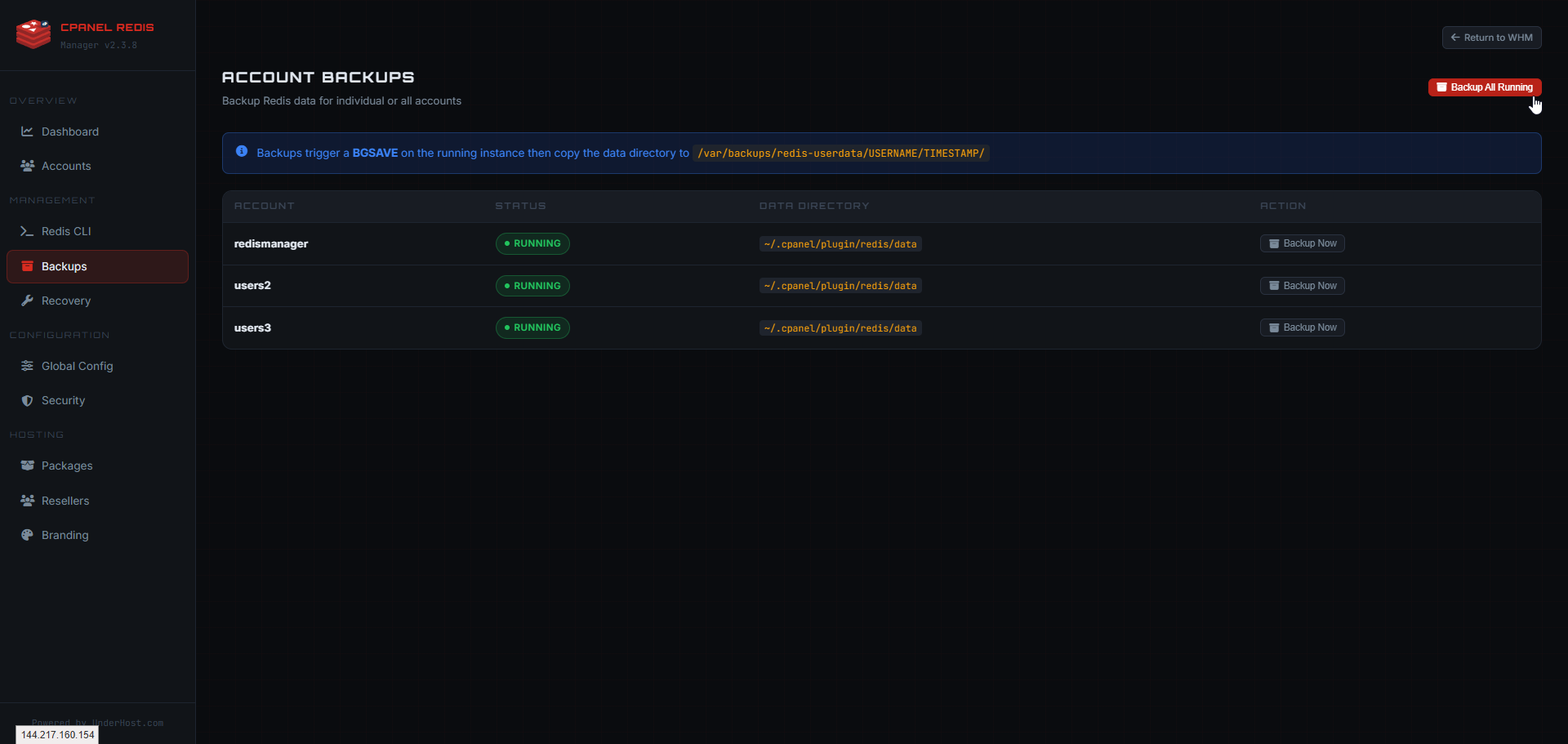
- Centralized backups: Manage backups for all Redis accounts with per-account actions and server-wide backup triggers.
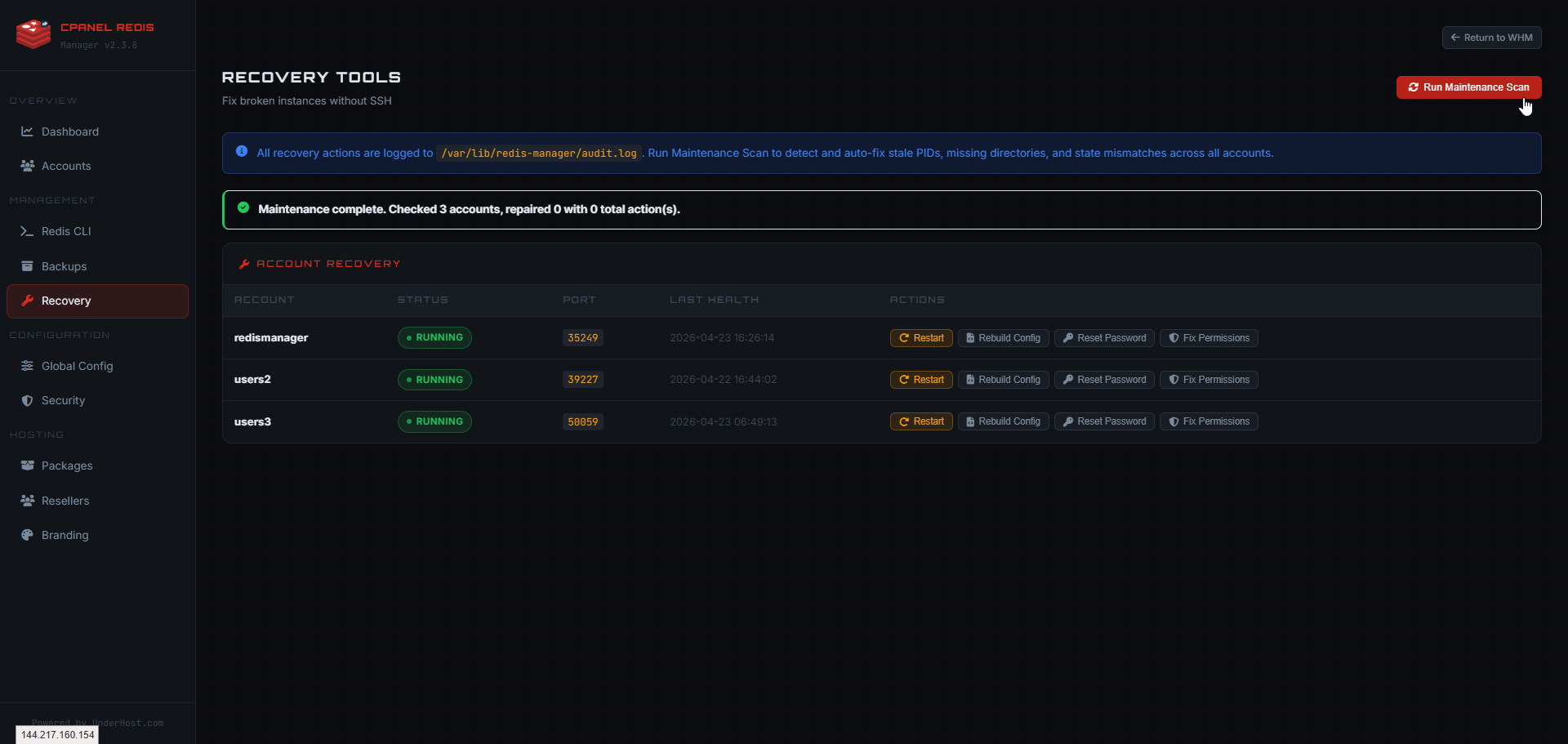
- Recovery tools: Maintenance scans, health checks, restart actions, config rebuilds, password resets, and permission repair across accounts.
- Global defaults: Set default Redis memory, eviction policy, database count, history retention, and user CLI access from one configuration page.
Security, Backups, and Recovery Built In
Running Redis without proper security and backup procedures creates risk. cPanel Redis Manager addresses this with built-in tools that make best practices easier to follow.
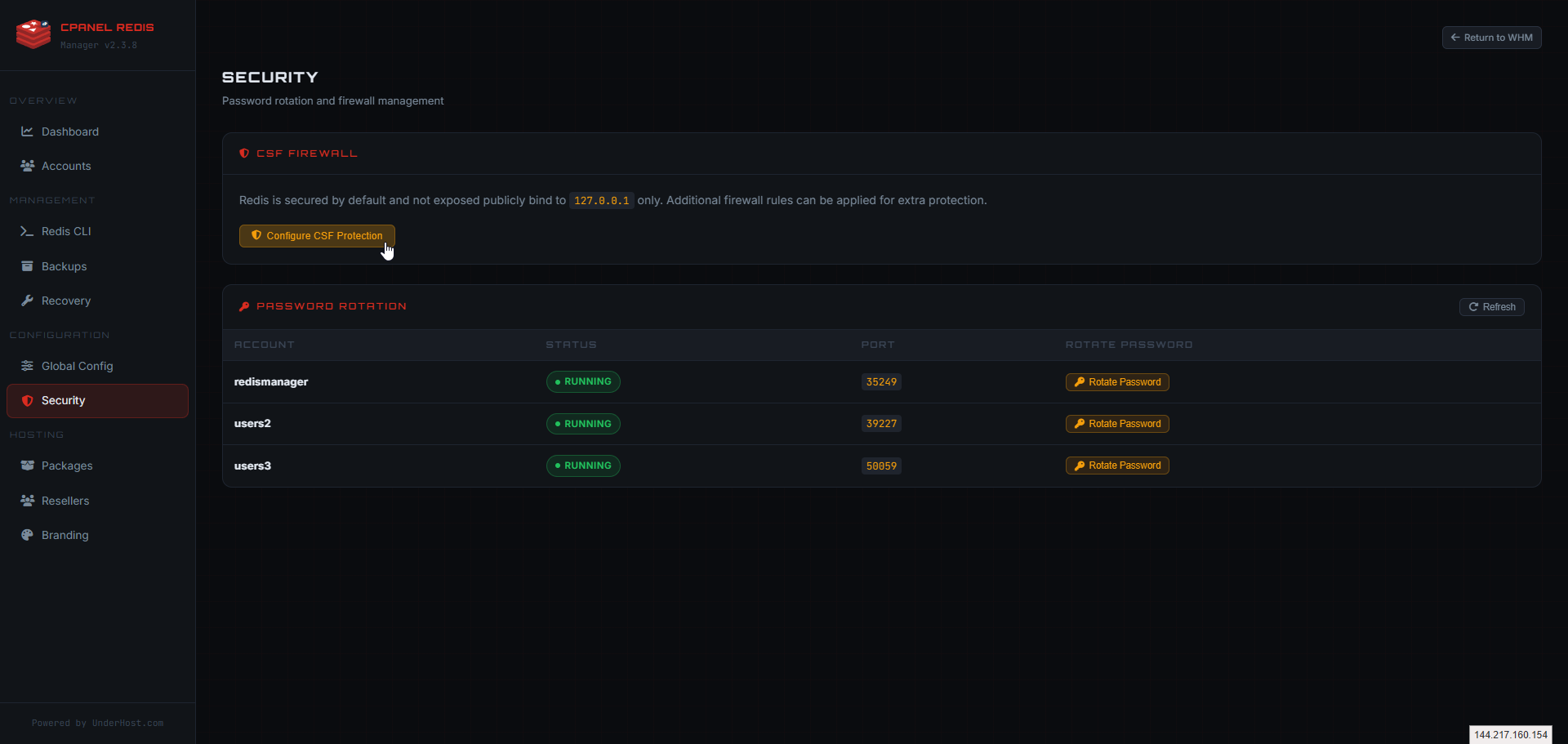
The security tools include:
- CSF firewall integration: Guidance for ConfigServer Security & Firewall rules specific to Redis.
- Localhost binding enforcement: Keep Redis instances bound to localhost by default to prevent external exposure.
- Password rotation: Per-account password rotation tools for regular credential updates.
- Backup automation: Server-wide and per-account backup triggers with restore capabilities.
- Recovery operations: Maintenance scans, health checks, config rebuilds, and permission repair.
Global Configuration and Package Management
For hosting providers who need to control Redis availability across different hosting plans, the WHM interface provides granular package configuration and global default controls.
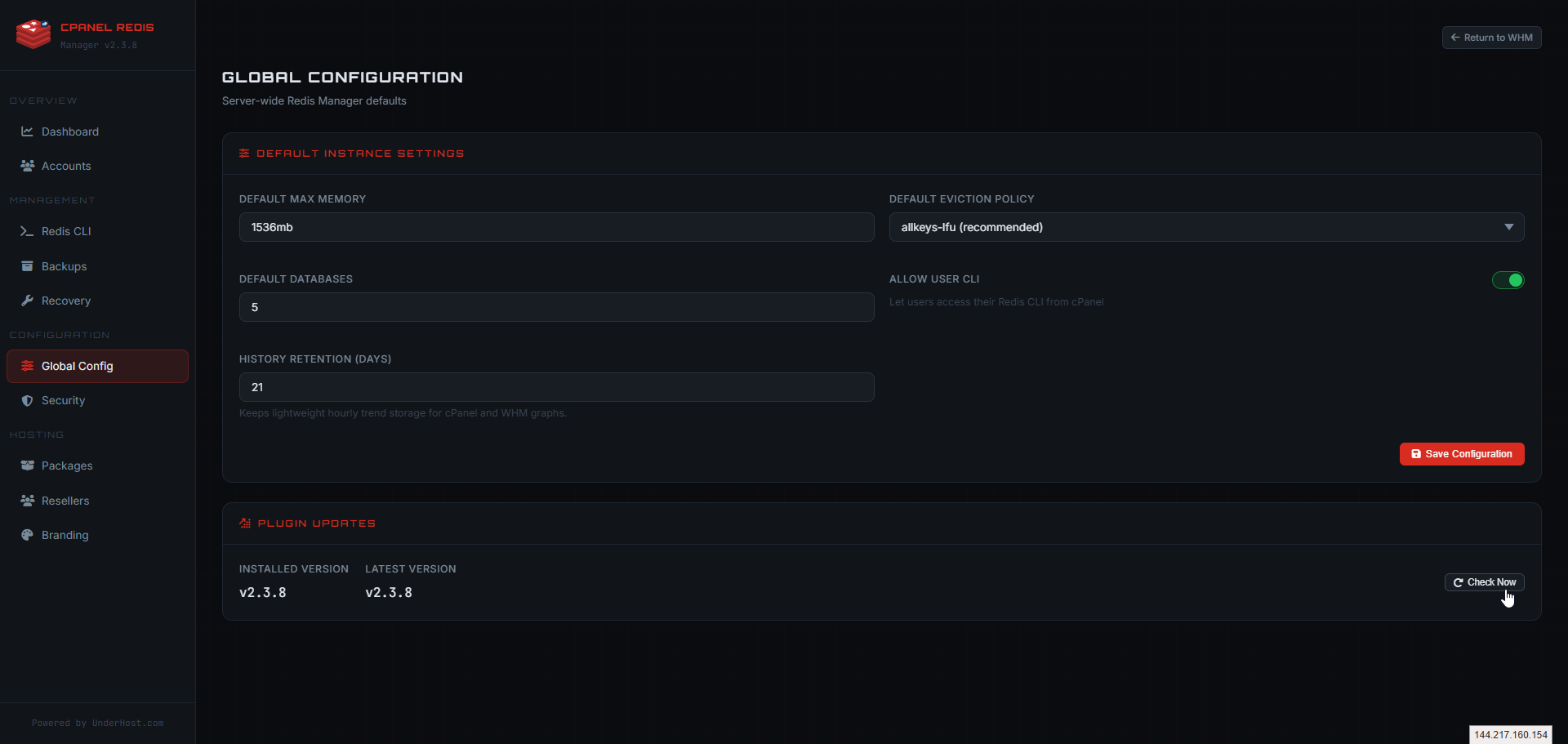
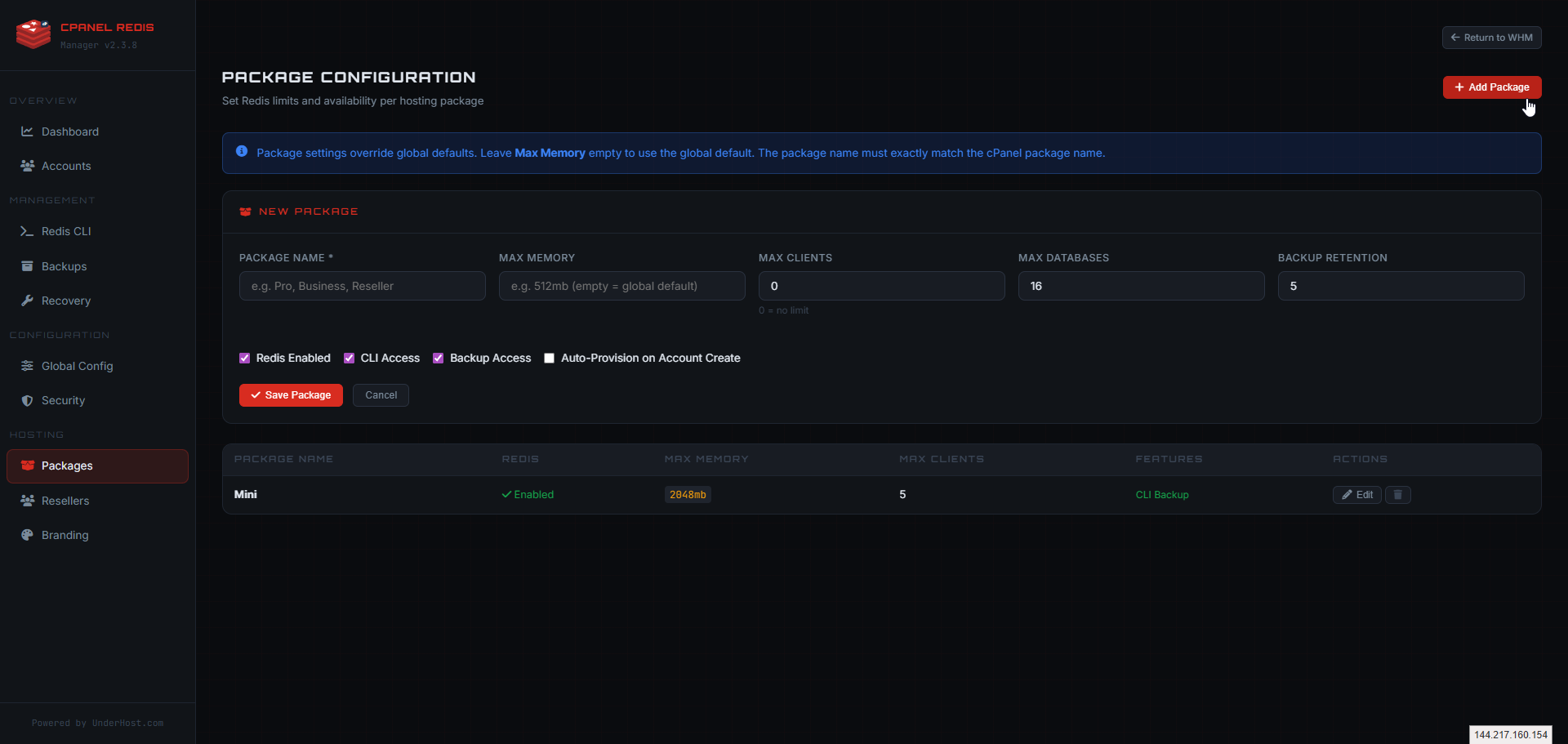
Administrators can define:
- Memory limits per package: Control how much memory each hosting plan can allocate to Redis.
- Client and database limits: Set connection and database count restrictions.
- Backup retention policies: Define how long backups are kept per package tier.
- CLI access controls: Enable or disable Redis CLI access on a per-package basis.
- Auto-provisioning behavior: Configure whether Redis is automatically available when accounts are created.
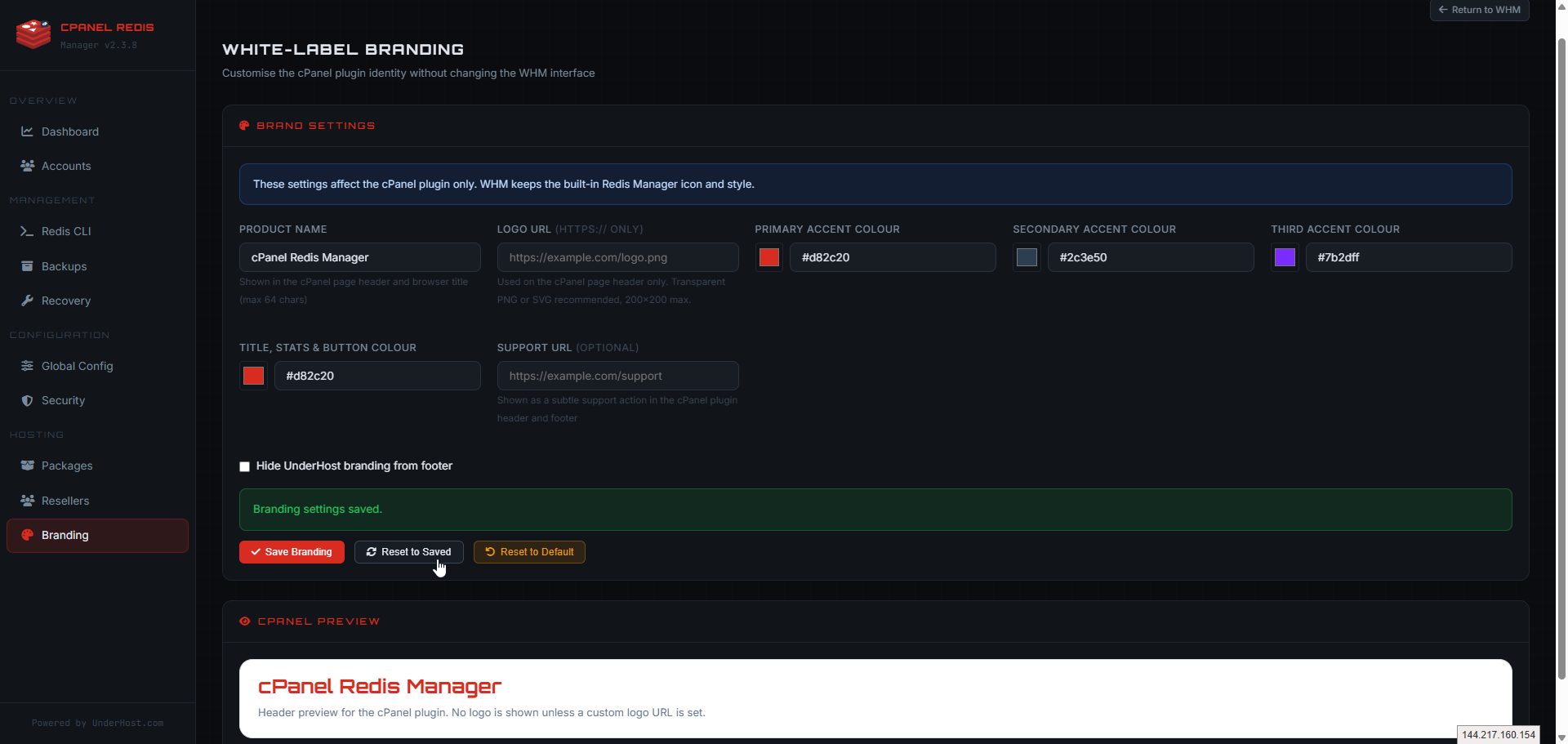
For hosting providers who want a branded experience, the WHM interface also includes full white-label controls. You can customize the product name, logo, support URL, accent colors, and footer visibility that cPanel users see.
Current Public Release Version
The version shown on the cPanel Redis Manager website is pulled directly from the live mirror, so the homepage, documentation, and upgrade guidance always stay synced with the active package.
Visit:
cpanelredismanager.com
Applications That Benefit from Redis
Redis Manager works for many workloads beyond just WordPress. Here are the applications that see the most benefit from Redis caching on cPanel servers:
WordPress & WooCommerce
- Object caching for faster page loads
- Reduced database queries
- Improved checkout performance
- Better handling of traffic spikes
Laravel & PHP Frameworks
- Application cache acceleration
- Session storage improvements
- Queue processing efficiency
- Rate limiting performance
Magento & eCommerce
- Catalog performance improvements
- Backend responsiveness
- Session handling at scale
- High-traffic readiness
Forums & Membership Sites
- Faster logged-in sessions
- Reduced repeated lookups
- Community platform responsiveness
- Learning management system speed
Custom APIs & Applications
- API response acceleration
- Session handling improvements
- Repeated computation caching
- Dashboard performance
CRM & Admin Panels
- Dashboard acceleration
- User session responsiveness
- Repeated backend request caching
- Business tool performance
Add Redis Performance to Your cPanel Server Today
Get the full cPanel and WHM Redis Manager experience with unlimited instances, ongoing updates, and support included.
Frequently Asked Questions
Q: Why use Redis instead of only tuning MySQL?
MySQL tuning still matters, but Redis reduces repeated database reads before they happen. By serving hot data from memory, applications respond faster and the database handles less repetitive work.
Q: How does Redis improve website performance?
Redis helps reduce latency, lower repeated queries, improve session handling, and keep websites, APIs, dashboards, and dynamic applications more responsive under load.
Q: Who is cPanel Redis Manager for?
It is built for anyone running cPanel or WHM, including website owners, developers, system administrators, agencies, and hosting providers who want Redis integrated into the control panel experience.
Q: Why use Redis Manager instead of managing Redis manually?
Redis Manager gives you a structured cPanel and WHM workflow for deployment, monitoring, backups, recovery, configuration, and ongoing administration without relying entirely on manual SSH commands.
Q: Do I need root access to install Redis Manager?
Yes. Installation, updates, and removal are server-level operations and require root access on a supported cPanel and WHM server.
Q: What is included with the license?
Each license includes the cPanel plugin, the WHM management interface, product updates, support, and access to the full documentation on cpanelredismanager.com.
Q: How is licensing priced?
Redis Manager is licensed at $4.95 per server per month, with monthly and yearly billing available. Yearly pricing includes 2 months free compared with paying month to month.
Q: Can I create unlimited Redis instances?
Yes. The licensed server supports unlimited Redis instances, giving you flexibility across accounts and workloads on that server.
Q: Does it work only with WordPress?
No. Redis Manager works for many workloads including WordPress, WooCommerce, Laravel, Magento, session-based applications, APIs, custom PHP apps, and other dynamic websites that benefit from caching and in-memory data access.
Q: What can users do from cPanel?
Users can manage their Redis instance, review connection details, monitor activity, apply configuration presets, and use backup and restore tools directly from cPanel.
Q: What can admins do from WHM?
Admins can manage accounts, run CLI commands, review server-wide metrics, control backups and recovery, configure security, define package limits, apply branding, and manage global Redis defaults from WHM.
Q: Is the version shown on the website live?
Yes. The public release version shown on cpanelredismanager.com is fetched server-side from the live mirror so the displayed version stays aligned with the active package.
Explore More UnderHost Services
cPanel Redis Manager is built by UnderHost to bring Redis performance to cPanel environments. Explore our hosting services that pair perfectly with Redis-accelerated applications:
- Shared Hosting – Reliable hosting for websites and applications with cPanel included.
- Cloud VPS Hosting – Scalable VPS servers with full root access and cPanel support.
- Offshore Dedicated Servers – High-performance dedicated servers in multiple global locations.
- Managed WordPress Hosting – WordPress hosting that benefits directly from Redis object caching.
- Server Management – Expert server administration for your hosting infrastructure.
- cPanel Hosting – cPanel-powered hosting plans with the control panel you prefer.
For questions about cPanel Redis Manager licensing, installation, or compatibility, visit the official site at cpanelredismanager.com or contact us through @CustomerPanel.


