
Redis & Valkey caching, built into cPanel & WHM
Deploy, manage, and sell Redis & Valkey caching in cPanel & WHM.
cPanel Redis Manager turns in-memory caching into a first-class control-panel feature. Website owners get faster WordPress and WooCommerce without touching the command line, agencies manage every client site from one place, and hosting providers can package, brand, and control caching as a premium plan feature — with Redis and Valkey supported side by side and existing Redis accounts always preserved.
v2.6.11
1-Click Setup
cPanel Plugin
WHM Control
Object Caching
Session Ready
Redis & Valkey
Multi-PHP
Lower TTFB
Less MySQL Load
Better App Speed
Why Redis?
Redis helps cPanel websites load faster, query less, and stay responsive under pressure.
For cPanel users, Redis is a practical performance upgrade. It keeps frequently used data in memory, reduces repeated database work, and helps websites and PHP applications respond faster as traffic grows.

Speed Up Websites and Web Apps
Redis-compatible backends such as Redis and Valkey store frequently used data in memory so websites, APIs, dashboards, and dynamic applications can respond faster with less waiting on database queries.
Reduce Database Load
By serving repeated lookups from memory, Redis-compatible caching lowers pressure on MySQL and other backend services, helping your server handle more work with fewer repeated queries.
Stay Responsive During Busy Traffic
Redis and Valkey can absorb repeat requests during traffic spikes, keeping applications more stable, improving response times, and reducing slowdowns when demand increases.
Available since v2.4.0
Valkey support is here for newer Redis-compatible hosting stacks.
Valkey is an open source Redis-compatible in-memory cache backend. As of v2.4.0, fresh installs detect the operating system and available packages before selecting Redis or Valkey: AlmaLinux, CloudLinux and Rocky 10 use Valkey, while AlmaLinux/CloudLinux 8 and 9 and Ubuntu stay on Redis. Existing Redis installations are never switched automatically.
Fresh Install Detection
OS 10+ Ready
Redis-Compatible
Existing Redis Preserved
 Available since v2.4.0. Existing Redis installations stay on Redis by default unless the administrator chooses otherwise.
Redis Performance Flow
From Request to Response
See how Redis improves performance by serving hot data from memory, reducing repeated database queries, and helping applications respond faster under real traffic.
Incoming request
A visitor, customer, API call, or logged-in user requests a page, action, or application resource.
App checks Redis
The application checks Redis first for cached data, stored sessions, or previously generated results.
Serve from memory
If the data is already cached, Redis returns it immediately from memory with far less delay than repeated backend processing.
Fallback when needed
If the data is not in Redis yet, the application fetches it from the database or backend source, then stores it in Redis for future requests.
Faster next response
Users get quicker load times, applications stay more responsive, and the server handles repeated traffic with less strain.
Data served instantly
Redis delivers the response directly from memory, reducing latency and avoiding unnecessary database activity.
Faster Loads
Less Latency
Lower DB Load
Redis warms for next time
The request still completes normally, and Redis stores the result so future requests are faster and more efficient.
Safe Fallback
Warm Cache
Fewer Queries
Redis Benefits
Better performance starts where your applications actually work.
Redis improves the experience people notice most: faster pages, smoother dashboards, quicker sessions, and less slowdown when websites or applications get busy.
WordPress & WooCommerce Optimization
Boost website speed, reduce query load, and improve checkout performance using Redis object caching for WordPress and WooCommerce.
Laravel & Modern PHP Frameworks
Enhance cache, sessions, queues, and rate limiting with Redis, fully compatible with Laravel and modern PHP applications on cPanel.
Magento & High-Traffic eCommerce
Improve catalog performance, reduce backend lag, and handle large traffic volumes with Redis-powered caching for Magento stores.
Custom Applications & APIs
Speed up APIs, session handling, and repeated computations for any custom PHP application using Redis on your cPanel server.
Forums, Communities & Membership Sites
Keep logged-in sessions responsive, reduce repeated lookups, and improve performance for busy forums, learning platforms, and membership-based websites.
CRM, Admin Panels & Business Tools
Accelerate dashboards, user sessions, and repeated backend requests for internal tools, portals, and business applications running on cPanel.
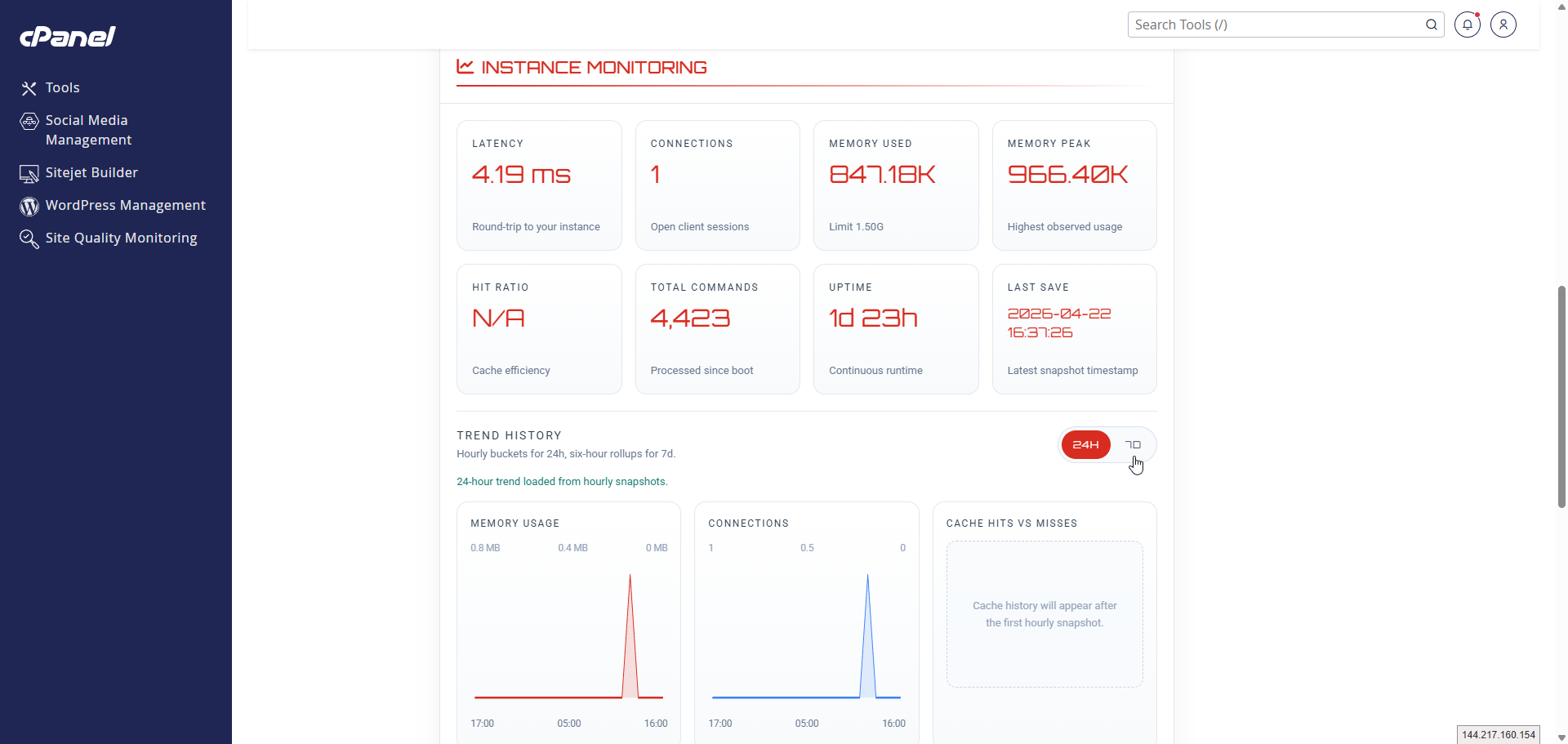
cPanel experience
Manage Redis from the cPanel interface you already know.
Users can enable Redis, review connection details, monitor activity, and manage their Redis instance directly from cPanel without needing server-level administration.
- Easy access from inside cPanel
- Simple Redis actions and monitoring
- Cleaner workflow for daily use
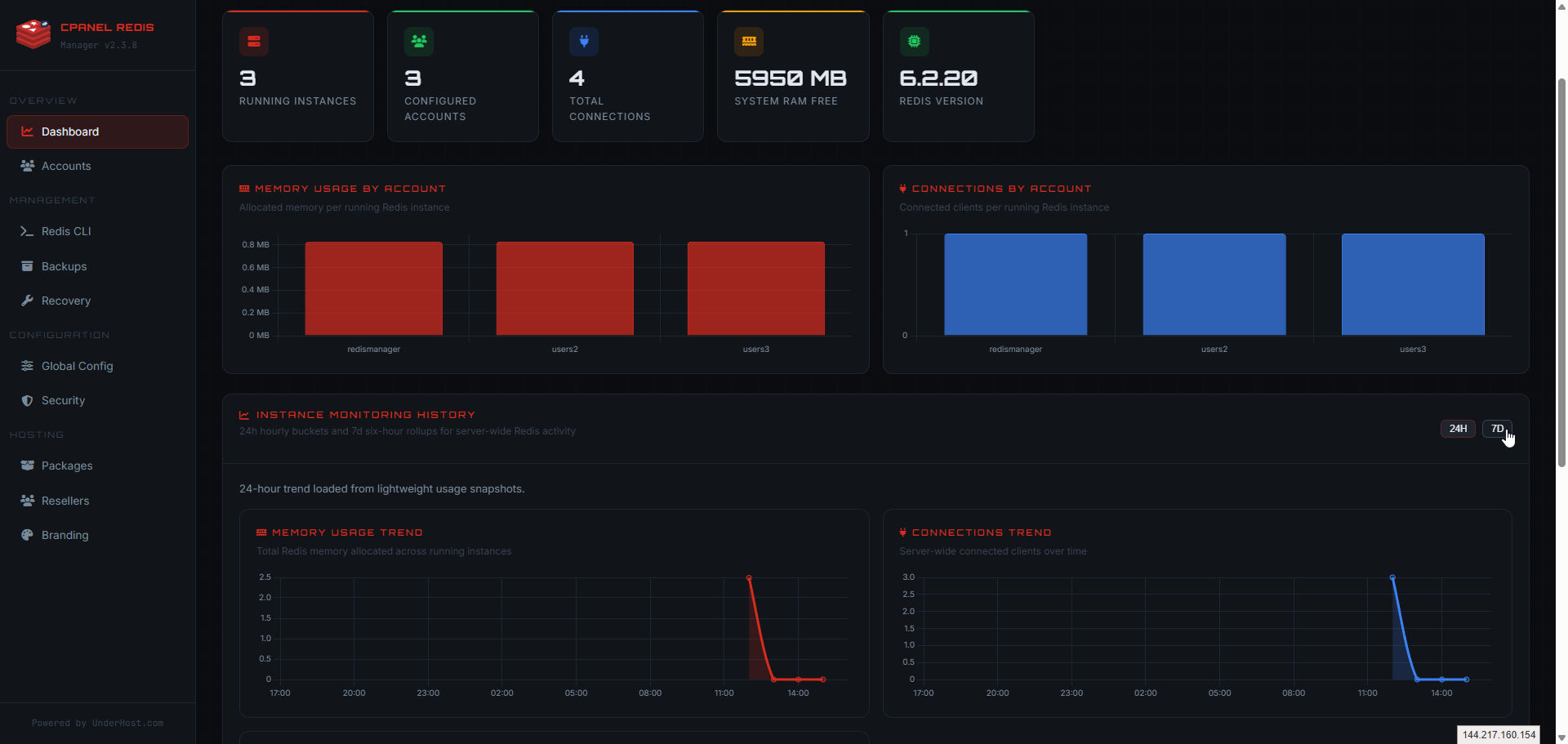
WHM experience
Keep server-wide Redis control and visibility inside WHM.
Admins can manage Redis across accounts with the oversight needed for provisioning, monitoring, recovery, and day-to-day server operations.
- Server-wide account visibility
- Admin controls and recovery tools
- Better oversight across users
Why install our cPanel module?
Because Redis is easier to use, manage, and benefit from when it is built directly into cPanel and WHM.
cPanel Redis Manager turns Redis into a practical control panel feature with simpler deployment, clearer management, and a better experience for users, admins, and hosting environments.
Built Directly for cPanel
Redis Manager integrates Redis-compatible caching into cPanel so users can access and manage Redis or Valkey from a familiar control panel interface.
Simple cPanel User Experience
Enable, monitor, and manage Redis from cPanel without relying on SSH commands or manual server-side steps.
Full WHM Administrative Control
WHM gives administrators the visibility and control needed to manage Redis-compatible cache backends across accounts, users, and server environments.
Easy Deployment and Maintenance
Installation, updates, and removal are streamlined so Redis can be deployed and maintained more consistently on cPanel servers.
Compatible with Real Hosting Stacks
Redis Manager is designed to work with Redis, Valkey, CloudLinux, EasyApache, and common cPanel hosting environments.
Practical Performance Benefits
Make Redis easier to adopt for faster applications, lower database load, and a better overall experience for users and admins.
Screenshots and product surfaces
See the cPanel and WHM workflow before you deploy it.
Product screenshots make the sales story easier: customers see a familiar cPanel experience, while providers see the WHM surfaces that keep Redis operationally manageable.
cpanel
cPanel user experience
The cPanel plugin gives each account a full Redis workflow with server details, live metrics, monitoring, app presets, and built-in backup and restore tools.
whm
WHM operator control panel
WHM gives server administrators a complete Redis control panel with dashboard visibility, account actions, CLI tools, backups, recovery, package controls, security settings, branding, and global configuration from one interface.
Who it's for
Built for the people who run cPanel servers every day.
Whether you own one website, build sites for clients, or run a hosting company, cPanel Redis Manager gives you a faster, simpler, and more controllable way to use Redis and Valkey — without living in the command line.
Faster sites, without the command line
Turn on Redis or Valkey caching for WordPress, WooCommerce and other apps from one cPanel screen — no SSH, no config files.
- Speed up WordPress and WooCommerce with object caching, using ready-to-paste connection settings for your app.
- Start, stop and monitor your cache from cPanel, with live status, memory use and connection counts at a glance.
- Apply a one-click preset (WordPress, Laravel, Magento, sessions) instead of guessing settings.
- Catch problems early: the setup checklist and health score flag misconfiguration before it affects visitors.
- Depend less on your host or a developer for routine cache management.
Standardize caching across every client site
Manage caching for many client accounts from cPanel and WHM, apply the same proven settings everywhere, and turn performance into a service you can sell.
- Provision and manage Redis or Valkey for many accounts from WHM, without per-site SSH work.
- Standardize configuration with presets so every project ships with the same recommended cache setup.
- Troubleshoot faster with usage graphs, a health score, and a one-click diagnostics export (credentials masked) you can attach to a ticket.
- Show clients measurable wins: lower time-to-first-byte and reduced database load.
- Reduce repetitive support by giving clients a safe, self-service cache screen.
A branded, sellable caching feature
Offer Redis and Valkey as a self-service, branded feature, control exactly who gets it, and build higher-value hosting plans around it.
- Enable or disable caching per hosting package, and set per-reseller quotas for instances and total memory.
- Roll out policy safely: report-only, warn, or enforce modes, with existing Redis accounts always grandfathered.
- White-label the interface with your product name, logo and colors.
- Cut support tickets with WHM recovery tools, backups, and a self-service cPanel experience for customers.
- Differentiate plans and improve retention with a premium performance feature, plus provider hook events for billing automation.
Actively developed & production-ready
A serious product with a clear roadmap — not a side project.
cPanel Redis Manager is in active development with a public changelog. Here is exactly what ships today, what is next, and where it is going — so you always know what you are buying.
Shipping today
- Redis and Valkey backends with OS-aware selection and existing-Redis preservation
- One-click cPanel setup, presets, and the WHM administration dashboard
- Backups and restore, usage graphs, health scoring, and diagnostics export
- Recovery tools, application detection, and framework connection snippets
- Provider controls: package-tier availability, reseller quotas, exposure modes
- One-click guided Redis-to-Valkey migration with automatic rollback
- White-label branding and provider hook events for automation
In development
- Security and abuse protection: smart resource enforcement and abuse detection
- Stronger AUTH handling and rate limiting
- Improved licensing and server fingerprinting
On the roadmap
- REST API and webhooks for automation and billing integration
- Deeper observability, slow-log tooling, and audit visibility
- Background workers, auto-healing, and orphan cleanup
- Cross-server export/import and stronger backup workflows
- Cluster and Sentinel scaling, and DirectAdmin support
Add Redis Manager to one server with predictable monthly or yearly pricing.
Every license includes the full cPanel and WHM experience, ongoing updates, and support so you can deploy, manage, and maintain Redis with confidence.
$4.95
per server / month
- One license per cPanel or WHM server
- Unlimited Redis instances on the licensed server
- Full cPanel and WHM integration included
- Product updates included
- Support included
- Documentation for installation, configuration, backup, and CloudLinux
- Built for website owners, developers, sysadmins, and hosting providers
Shared and reseller dedicated hosting
Add Redis to cPanel accounts with a cleaner workflow for users and better oversight for admins.
Managed VPS and cloud servers
Deploy Redis on cPanel-based servers with simpler configuration, monitoring, and daily management.
High-traffic apps and websites
Reduce repeated queries, improve response times, and keep applications more responsive as usage grows.
Frequently asked questions
Common questions about Redis Manager for cPanel and WHM.
Find clear answers about Redis performance, cPanel integration, deployment, licensing, and what to expect after installation.
Why use Redis instead of only tuning MySQL?
MySQL tuning still matters, but Redis reduces repeated database reads before they happen. By serving hot data from memory, applications respond faster and the database handles less repetitive work.
How does Redis improve website performance?
Redis helps reduce latency, lower repeated queries, improve session handling, and keep websites, APIs, dashboards, and dynamic applications more responsive under load.
What is Valkey?
Valkey is an open source, Redis-compatible in-memory cache server developed under the Linux Foundation. It is designed to work with Redis-compatible clients and commands, which makes it an important option for hosting providers on newer operating systems where Redis packages may be unavailable, deprecated, or replaced.
When is Valkey installed?
Fresh installations detect the operating system and available packages before choosing a backend. Existing Redis installations stay on Redis by default. OS 10+ installs such as CloudLinux 10, AlmaLinux 10 and Rocky Linux 10 use Valkey, while AlmaLinux/CloudLinux 8 and 9 and Ubuntu 24.04 use Redis. cPanel can also provide Valkey through EasyApache on AlmaLinux and Ubuntu, but the native default on those systems remains Redis. Administrators can also choose the backend explicitly from WHM.
Does Valkey replace Redis for existing users?
No. Existing Redis users are not migrated or switched to Valkey automatically. Valkey is used for new installations on newer operating systems and for providers who explicitly choose Valkey from WHM.
Who is cPanel Redis Manager for?
It is built for anyone running cPanel/WHM, including website owners, developers, system administrators, agencies, and hosting providers who want Redis integrated into the control panel experience.
Why use Redis Manager instead of managing Redis manually?
Redis Manager gives you a structured cPanel and WHM workflow for deployment, monitoring, backups, recovery, configuration, and ongoing administration without relying entirely on manual SSH commands. It also adds per-account isolation, package and reseller controls, and safe recovery tools that a manual Redis install does not provide.
Is cPanel Redis Manager production-ready and actively maintained?
Yes. It runs on real cPanel and WHM servers today, ships with a public changelog and versioned releases, and is under active development. It is built with safe defaults, preserves existing Redis accounts on upgrade, and includes WHM recovery tools so administrators can resolve issues without SSH.
Can hosting providers resell or white-label it?
Yes. Providers can white-label the interface with their own product name, logo and colors, control which hosting packages include caching, set per-reseller quotas for instances and memory, and choose whether policy is report-only or enforced. It is designed to become a branded, sellable feature for building higher-value hosting plans.
Can I migrate an existing Redis account to Valkey?
Yes. An administrator can migrate a single account between Redis and Valkey with one click from WHM. Because Redis and Valkey share the same data format, the migration snapshots the data, switches the backend, verifies the result, and automatically rolls back if anything fails, so existing data is preserved.
Do I need root access to install Redis Manager?
Yes. Installation, updates, and removal are server-level operations and require root access on a supported cPanel and WHM server.
What is included with the license?
Each license includes the cPanel plugin, the WHM management interface, product updates, support, and access to the full documentation.
How is licensing priced?
Redis Manager is licensed per server, with monthly and yearly billing available. Yearly pricing includes 2 months free compared with paying month to month.
Can I create unlimited Redis instances?
Yes. The licensed server supports unlimited Redis instances, giving you flexibility across accounts and workloads on that server.
How do applications connect after installation?
The plugin manages Redis instances and connection details, but your application still needs the proper Redis client extension or library enabled in its runtime. Documentation covers the supported setup flow.
Does it work only with WordPress?
No. Redis Manager works for many workloads including WordPress, WooCommerce, Laravel, Magento, session-based applications, APIs, custom PHP apps, and other dynamic websites that benefit from caching and in-memory data access.
What can users do from cPanel?
Users can manage their Redis instance, review connection details, monitor activity, apply configuration presets, and use backup and restore tools directly from cPanel.
What can admins do from WHM?
Admins can manage accounts, run CLI commands, review server-wide metrics, control backups and recovery, and apply branding. Provider controls let you choose Redis or Valkey per server, enforce package-tier cache availability and reseller quotas (instances and memory), set Simple, Developer, or Advanced interface exposure, and migrate an account between Redis and Valkey with a single click. Enforcement is report-only by default, and existing Redis accounts are always preserved.
Is the version shown on the website live?
Yes. The public release version shown on the site is fetched server-side from the live mirror so the displayed version stays aligned with the active package.
How Redis is used
Connect Redis to the apps running on your server.
Redis Manager provides the service inside cPanel. Your applications use it for caching, sessions, and faster data access.
Object cache
Reduce database queries and speed up page load times with Redis object caching.
Cache & sessions
Use Redis for application cache, sessions, and queues in modern PHP frameworks.
Store performance
Improve backend responsiveness and handle high traffic more efficiently.
API & session speed
Speed up APIs, dashboards, and repeated data operations using in-memory storage.
Sessions & real-time
Speed up user sessions, real-time interactions, and community data with in-memory storage.
Data & dashboard speed
Speed up dashboards, customer records, and repeated business operations using in-memory storage.
Ready to add Redis to cPanel?
Bring faster performance to your server with a clean cPanel and WHM Redis workflow.
Use cPanel Redis Manager to deploy, manage, and monitor Redis more easily while giving users and admins a better experience inside the control panel they already use.